Switching to GymPoint? We Made It Painless.
GymPoint imports your members, billing history, payment methods, and class data from your current platform — so you can go live in a day, not a month.
Data Import Wizard
Drop your CSV export here
Supports Mindbody, Zen Planner, Wodify & more
Trusted by owners switching from
Any platform with CSV export — If you can export it, we can import it.
Complete Continuity. No Data Left Behind.
We don't just move names; we transfer the entire ecosystem of your business relationships.
Member profiles
Contact info, emergency contacts, and personal preferences.
Membership plans
Recurring contracts, family plans, and corporate rates.
Billing history
Past invoices, payment status, and credit ledger.
Payment methods
Secure token transfer for zero billing disruption.
Class schedules
Historical attendance, future bookings, and roster logs.
Attendance history
Lifetime visit counts and member engagement data.
Waivers & documents
Signed agreements, health forms, and stored IDs.
Lead pipeline data
Prospect lists, follow-up logs, and conversion notes.
The 5-Step Transition
Our automated engine does the heavy lifting while you stay in control.
Export
Download your data from your current provider's dashboard.
Upload
Drag and drop your files into our secure import portal.
Review & Confirm
Our engine maps the columns. You verify the data match.
Go Live
Data is populated across your GymPoint environment instantly.
Re-enroll cards
Automated emails prompt members to confirm secure billing info.
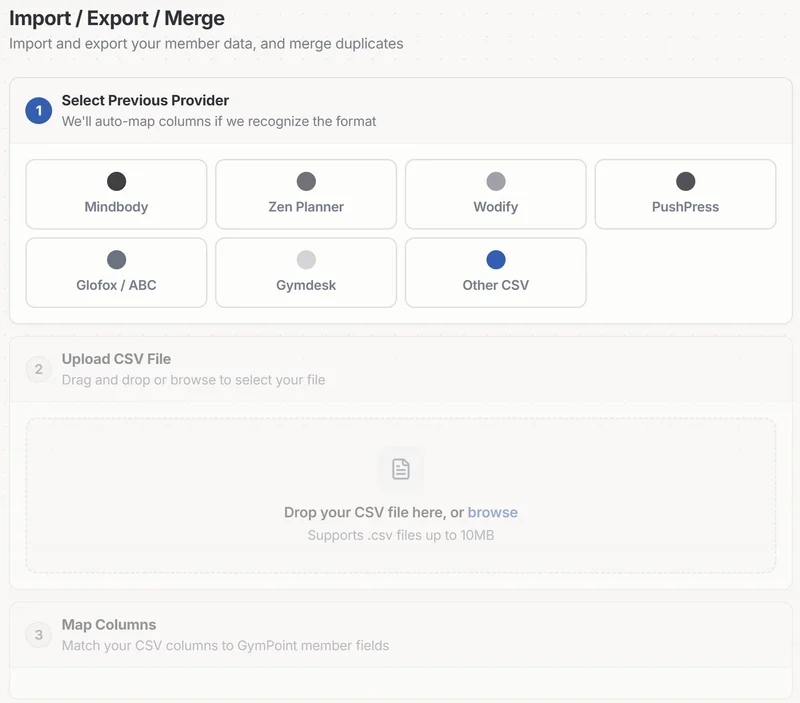
Advanced Tools for a Flawless Transfer.
- check
Dedicated migration guides
Step-by-step instructions specifically for your old platform.
- check
Column auto-mapping
Smart detection of 'First Name', 'Email', and 'Billing Frequency'.
- check
Duplicate detection
Automatically flags and merges overlapping member records.
- check
Dry run mode
Test the import without affecting your live database.
- check
Derived status calculation
Smartly assigns Active/Inactive status based on last visit date.
Eliminate the Fear of Switching.
Your data comes with you — all of it. Start your new chapter with zero baggage.