Gym Class Scheduling Software Without the Spreadsheets
Fitness scheduling software built for high-performance class management. Build complex schedules in seconds and give your members the premium booking experience they deserve.
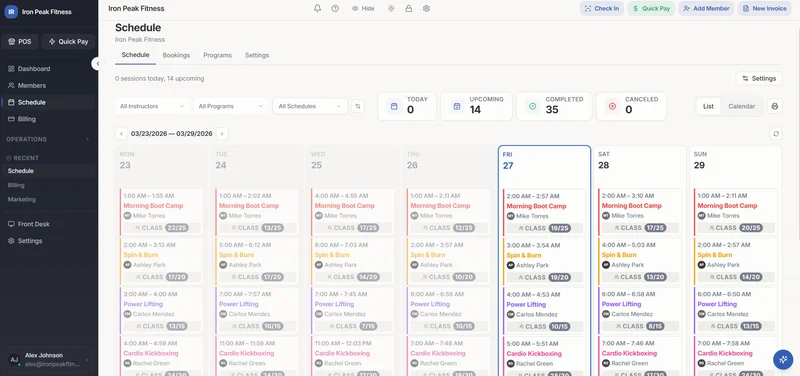
Scheduling Software for Gyms: Built for Performance, Made for Ease
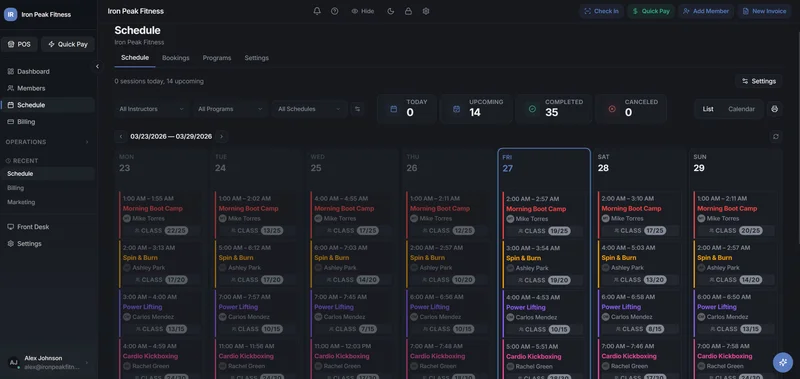
Visual weekly builder
Add sessions right on the week view, color-code them, and filter by schedule or instructor. Changes show up on your member portal and booking widget right away.
Recurring sessions
Repeat a session daily, weekly, every 2 weeks, or monthly. Edit one date, every future session, or the whole series without breaking the pattern.
Instructor management
Assign an instructor to each session or to a whole schedule, and filter the week by instructor to balance workloads. Your public instructor page shows each coach's profile, and classes taught count toward session pay on the Payroll page.
Capacity & Waitlists
Set class size limits and turn on waitlists per class. When someone cancels, the first waitlisted member is moved in and emailed, so open spots get filled.
Self-service booking
Members browse live class availability, reserve spots, and cancel bookings from any device. Real-time capacity updates prevent overbooking and eliminate front desk phone traffic.
Class check-in
Members type their check-in code at the kiosk or scan a key tag or the QR code in their portal with a connected scanner. Check-in looks at the member's membership, and you can also require a booking or block members with overdue payments.
No-show tracking
Mark no-shows from the roster or let GymPoint mark them a set number of minutes after class ends. Set optional late-cancel and no-show fees, charged to the card on file or invoiced.
Multi-location support
Pro lets you manage more than one location under a single GymPoint account, with the same schedule, team, and member tools you use for one.
Courses & workshops
Schedule and sell one-time or multi-session courses and workshops separately from your recurring class schedule - priced and booked on their own, not tied to a membership.
Trial-class booking
Prospects book a trial class from your trial booking page. The booking creates a lead record marked as a trial, so your team can follow up and add them to the pipeline.
Put Your Live Schedule on Your Own Website
Embed your real, live class schedule directly on your own website with an embeddable widget - complete with per-session descriptions and colors. Visitors browse and book without ever leaving your site.
- check_circleLive schedule, always in sync with GymPoint
- check_circlePer-session descriptions and color coding
- check_circleBooking built directly into the embed
Scheduling Driven by Intelligence
Gym schedule software should do more than fill slots. On Growth and Pro, Pulse AI turns booking and attendance data into signals your team can act on.
Weekly Attendance Insights
Every Sunday, Pulse compares check-ins, new members, and cancellations to last week and suggests what to look at next.
Drafted Re-Engagement
When a member starts slipping, Pulse drafts a re-engagement email or text. Your staff reviews it and decides whether to send.
Churn Signal Detection
Health scores weigh attendance trends and class booking frequency, flagging members who have stopped coming so your team can reach out before they cancel.
Lead Scoring for Trials
Add trial bookers to your pipeline and Pulse scores each lead from 0 to 100, so your team knows who to follow up with first.
Attendance Tracking
Leverage granular attendance reporting to eliminate guesswork in your studio.
Peak Hour Insights
Peak Hours charts show check-ins by hour of day and day of week, so you can see your busiest times.
Schedules Managed
Built for boutique studios and high-volume gym franchises alike.
Gym Class Scheduling, Answered
Yes. Members browse live class availability, reserve spots, and cancel bookings from any device, and real-time capacity updates prevent overbooking. You can also embed your live schedule on your own website so visitors book without leaving your site.
Yes. Set a class size limit and turn on the waitlist for that class. When a booked member cancels, GymPoint moves the first person on the waitlist into the class and emails them. If the class has a price, they get an invoice for it.
Yes. Create a session once and set it to repeat daily, weekly, every 2 weeks, or monthly, and GymPoint fills the calendar ahead. Change a single date, every future session, or the whole series without rebuilding it.
Yes. Staff mark no-shows from the class roster, or GymPoint can mark them automatically a set number of minutes after class ends. You can charge a late-cancel fee and a no-show fee, and choose whether a missed class still uses the member's booked session.
Yes. Prospects book a trial class from your trial booking page, and the booking creates a lead record marked as a trial so your team can follow up.
GymPoint is free for unlimited members (GymPoint Payments required); Growth is $39/month and Pro is $99/month. No long-term contracts, and no setup fees except a $15 setup fee if you turn on text messaging.
Maximize Your Gym's Capacity
Streamline your operations and give members an exceptional experience with GymPoint.