Pickleball Club Software
Pickleball club software that runs open play, hourly court booking, memberships, lessons and the pro shop from one system. Free for unlimited members.
GymPoint is club management software for pickleball clubs and for gyms, rec centers and community centers with courts. Open play sessions cap themselves and can keep a waitlist, courts book by the hour on a public page with peak pricing, and dues run on recurring billing in the same account.
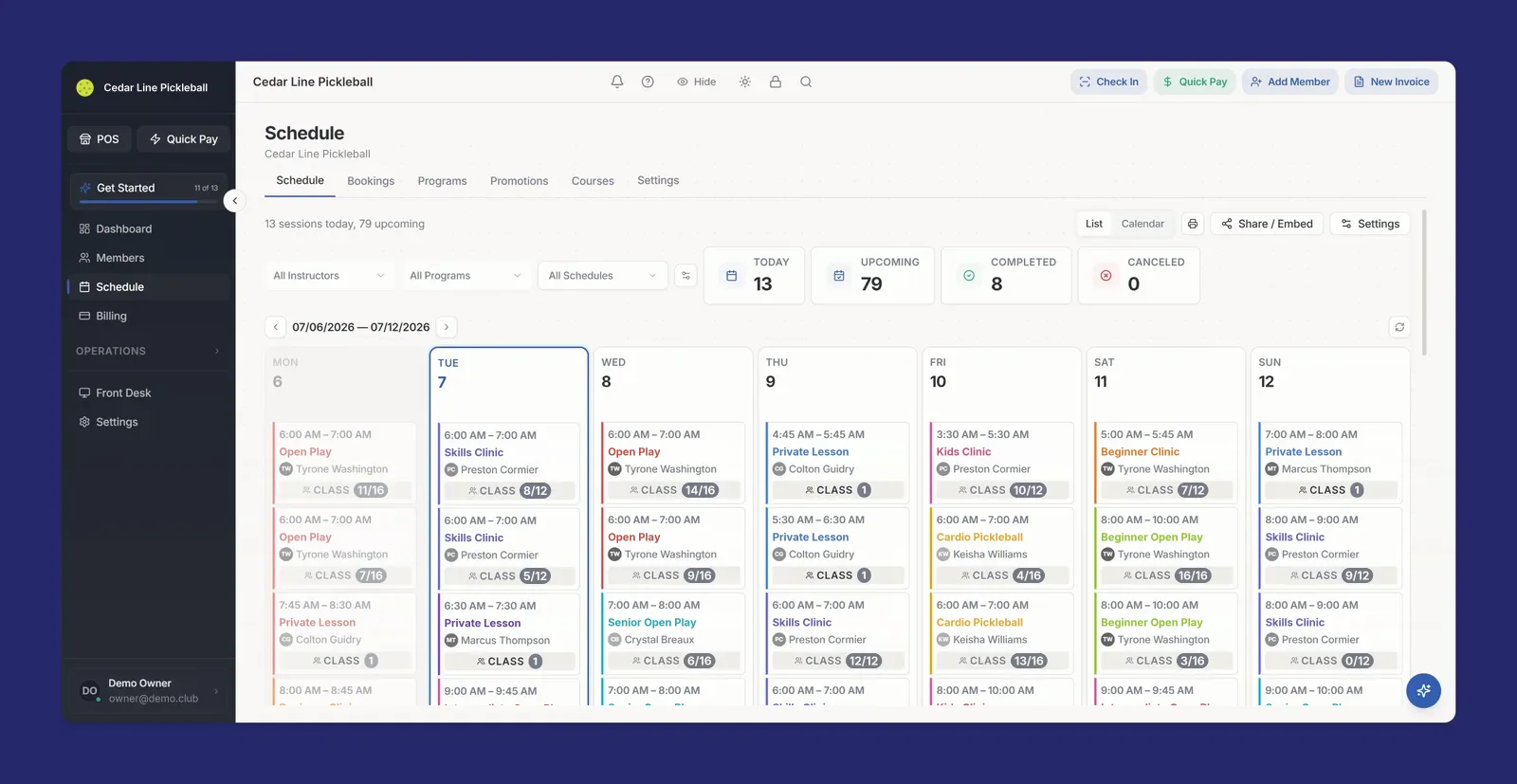
How a Pickleball Club Runs on GymPoint
A pickleball club sells several things at once: spots in open play, hours on a court, memberships, lessons and gear. When each one lives in a different app, the front desk spends the day copying names between them. Here is how each part of the club works in one system.
Open play that caps itself
Each open play session is a scheduled class with a player cap. Set the cap to what your courts can rotate, players book online, and booking closes when the session is full. Turn on the waitlist and a cancellation moves the next player in, with the session details sent by email.
Price each session the way your club sells it: a drop-in price for non-members, members-only sessions for your regulars, and passes or class packs, such as a 15-visit pass, whose credits come off at booking. Weekday morning play, an evening session and a Saturday social can each carry their own cap and price.
Courts by the hour, with peak rates
Each court is its own bookable space with a name, a photo and open hours for every day of the week. Set an hourly rate and an optional peak rate with a peak window, so a weeknight hour can cost more than a mid-morning one. Every hour is priced on its own and the price is locked at booking.
Courts are booked by the hour, by anyone, with a card, on your public booking page or at the front desk. Bookings start on the hour and run in whole hours, between a minimum and maximum length you set per court, up to 12 hours. Two bookings can never overlap on the same court.
Memberships in the same system
Members pay dues on automated recurring billing with a card on file. Family accounts keep a household under one card, and e-sign waivers are signed at signup, from the member portal or on a tablet at the front desk. Members check in at the kiosk and book open play from the member portal, which they install on their phone from the browser.
Open play, passes, court bookings, lessons and dues all run through the same account, with cards processed by GymPoint Payments. Every court renter becomes a customer record, so renters land in the same customer list as your members and open play regulars.
A door code with every booking
Give each court a door code. GymPoint reveals it only on a confirmed booking, in the confirmation email and by text if your club has an SMS number and the player adds a phone. A reminder text goes out about an hour before start, so an early court does not need someone at the desk to let players in.
Members get in through the Kisi integration. Door access follows billing: a frozen, canceled or overdue membership loses access after your grace period, and access comes back when the member is in good standing. Members tap a fob or keycard, scan a QR pass from the portal on a QR-capable reader, or use the portal's Open Door button, and every entry logs a check-in. Kisi hardware and subscription costs are separate.
Lessons and clinics
A clinic or small-group lesson runs the same way as open play: a capped session with online booking, its own price and an optional waitlist. A drill clinic for eight fills at eight, and the ninth player waits for an opening instead of emailing the pro.
One-on-one paid lessons run as appointments with a coach. Each coach who is marked bookable online gets a personal booking link that shows only their hours, so a player who trains with one pro books that pro.
Pro shop at the front desk
Sell paddles, balls, grips and apparel at the front desk point of sale. Inventory quantities update with every sale, and low-stock alerts warn you before you run out.
Charge a member's card on file for a sleeve of balls, or ring up a guest who just finished a court hour. Every sale lands in the same system as your memberships and bookings.
A court booking, start to finish
Share one link wherever players look for courts: your website, your newsletter, your social profiles. Players see each court with its starting price and peak note, then pick an open hour on a calendar in your club's timezone. No account, no app to download.
The card is entered at checkout and payments run on GymPoint Payments, powered by GoDaddy. Checkout is tied to a signed price offer, so retries never double charge and the player pays the price they saw.
Confirmed bookings get confirmation and reminder messages, and the door code goes out with the confirmation. On your side, every court booking shows on the staff schedule next to your open play sessions and clinics, with a filter by space.
How a player books a court
- 1Court: pick the court
- 2Day and time: choose an open start hour and a length in whole hours
- 3Your info: name and contact details
- 4Payment: card charged now, or saved until staff approve
- 5Done: confirmation email, with the door code if the court has one, and a reminder text about an hour before start
Court rules, set once per court
Every court carries its own settings, so a covered court and an outdoor court can follow different rules. Front desk staff can book any court for a walk-in or a regular and take card, cash or check, or comp the hour.
Open hours and closures
Set open hours per weekday for each court. Close one court for resurfacing or every court for a holiday.
Notice and book-ahead
Set the minimum notice before a booking and how far ahead players can book, per court.
Instant or approval
Instant charges the card and confirms right away. Approval saves the card, and it is charged when staff approve.
Cancellations
Staff cancel and refund inside the cancellation window you set for each court.
Court booking uses the same tools as GymPoint space rental, which is available on every plan and requires GymPoint Payments.
Open play and court time on one schedule
If your week mixes open play blocks with hours that are free to rent, GymPoint handles both. You set each court's bookable hours, with up to three windows per weekday, and run open play as scheduled sessions. Open play does not block a court automatically, so build each court's hours around your sessions: open play on weekday mornings, for example, and courts open to rent in the afternoon and evening.
Staff see both on the same schedule, filter rentals by court, and change a session's cap when a court is down for repairs.
Clubs, gyms and rec centers with courts
A dedicated pickleball club that runs on memberships and open play gets the whole operation in one place: dues, sessions, court booking, lessons, door access and the pro shop.
A gym, rec center or community center that added courts gets a way to sell court hours to the public without a second system. The courts sit next to your classes, your members and your door access, and the Free and Growth plans cover one location while Pro is unlimited.
What it costs
GymPoint's Free plan is $0 per month for unlimited members at one location, with GymPoint Payments required. You pay card processing: 2.49% + 20 cents in person and 3.49% + 20 cents for online and card-on-file payments. Texting has its own small charges. Growth is $39 per month and Pro is $99 per month, with no contracts.
Court booking, open play, memberships, the member portal and the point of sale are on every plan. The pricing page lists what each plan adds, and the Free plan page lists exactly what is included at $0.
What pickleball club software costs
These are GymPoint and four platforms built around court reservations, with each vendor's published entry price. Read the billing term and the court count with the price. Some court platforms, such as CourtReserve and YourCourts, offer league or ladder tools that GymPoint does not have, so compare features as well as cost. Where a vendor publishes no price, the cell says Not published.
| Platform | Starting price | Free plan | Notes | Source |
|---|---|---|---|---|
| GymPoint | $0, then $39 or $99/mo | Yes, unlimited members | Free requires GymPoint Payments and covers one location. Processing 2.49% + 20c in person, 3.49% + 20c online. SMS costs extra. | Pricing |
| CourtReserve | $199/mo, or $159/mo billed annually | Free trial by request | Launch plan, includes 8 courts. Advance includes 16 courts at $369/mo, or $329/mo billed annually. Momentum includes 32 courts at $549/mo, or $499/mo billed annually. Card processing rates are not on the pricing page. | Pricing |
| Playbypoint | $199/mo on an annual contract | Not published | Essential plan. Advanced is $399/mo and Premium is $599/mo, both on an annual contract. Listed card fees are 2.9% + 30c on Essential and 2.7% + 15c on Advanced and Premium. | Pricing |
| YourCourts | $25/mo, or $225/yr | 30-day free trial | Lite plan, up to 2 courts. Plans rise with court count to $102/mo for up to 20 courts. Online payments start on the $44/mo plan and membership management on the $66/mo plan. Transaction fees are not published. | Pricing |
| PodPlay | Not published | Not published | Four plans are listed without prices: Basic, Basic Plus, Pro and Autonomous +. The page's call to action is Book a demo. | Pricing |
Prices last checked 11/13/2026 on each vendor's pricing page. Confirm the terms that apply to your account before choosing a plan.
Pickleball Clubs, Answered
Yes, by the hour. Players open your public booking page, pick a court, a day and an open start hour, enter a card and book. No account is needed. Bookings start on the hour and run in whole hours, within the minimum and maximum length you set for each court. Front desk staff can also book a court for someone and take card, cash or check, or comp it.
Yes. Each court has an hourly base rate and an optional peak rate with a peak start and end time. GymPoint prices every hour of a booking on its own, so a booking that crosses into peak hours is priced correctly, and the price is locked when the player books.
No. GymPoint has no league, ladder, tournament or rating tools. It runs the rest of the club: capped open play and clinics with waitlists, hourly court booking, memberships and billing, lessons, door access and the pro shop.
Each open play session is a scheduled class with a player cap, online booking and an optional waitlist. Give each session its own pricing: a drop-in price for non-members, members-only access, or passes and class packs, such as a 15-visit pass, whose credits are used at booking. When a booked player cancels, the next player on the waitlist is promoted and gets the session details by email.
Each court can have a door code. GymPoint sends it only on a confirmed booking, in the confirmation email, and by text if your club has an SMS number and the player adds a phone, with a reminder text about an hour before start. Members get in through the Kisi integration with a fob, keycard, QR pass or the Open Door button in the member portal.
You decide which hours each court is open for booking, with up to three windows per weekday. Open play sessions do not block a court automatically, so set each court's hours around your open play blocks. Both show on the staff schedule, and you can filter rentals by court.
GymPoint's Free plan is $0 per month for unlimited members at one location, with GymPoint Payments required. You pay card processing: 2.49% + 20 cents in person and 3.49% + 20 cents for online and card-on-file payments. Texting has its own small charges. Growth is $39 per month and Pro is $99 per month, with no contracts. Court booking is available on every plan.
Set up your pickleball club on GymPoint
Bring your open play schedule, your court rates and your membership prices. Add each court with its hours and peak window, set the player cap on each session, connect GymPoint Payments and share your booking page. Free for unlimited members.
Free plan requires GymPoint Payments. Processing and texting charges apply.